
Quiet Tempo
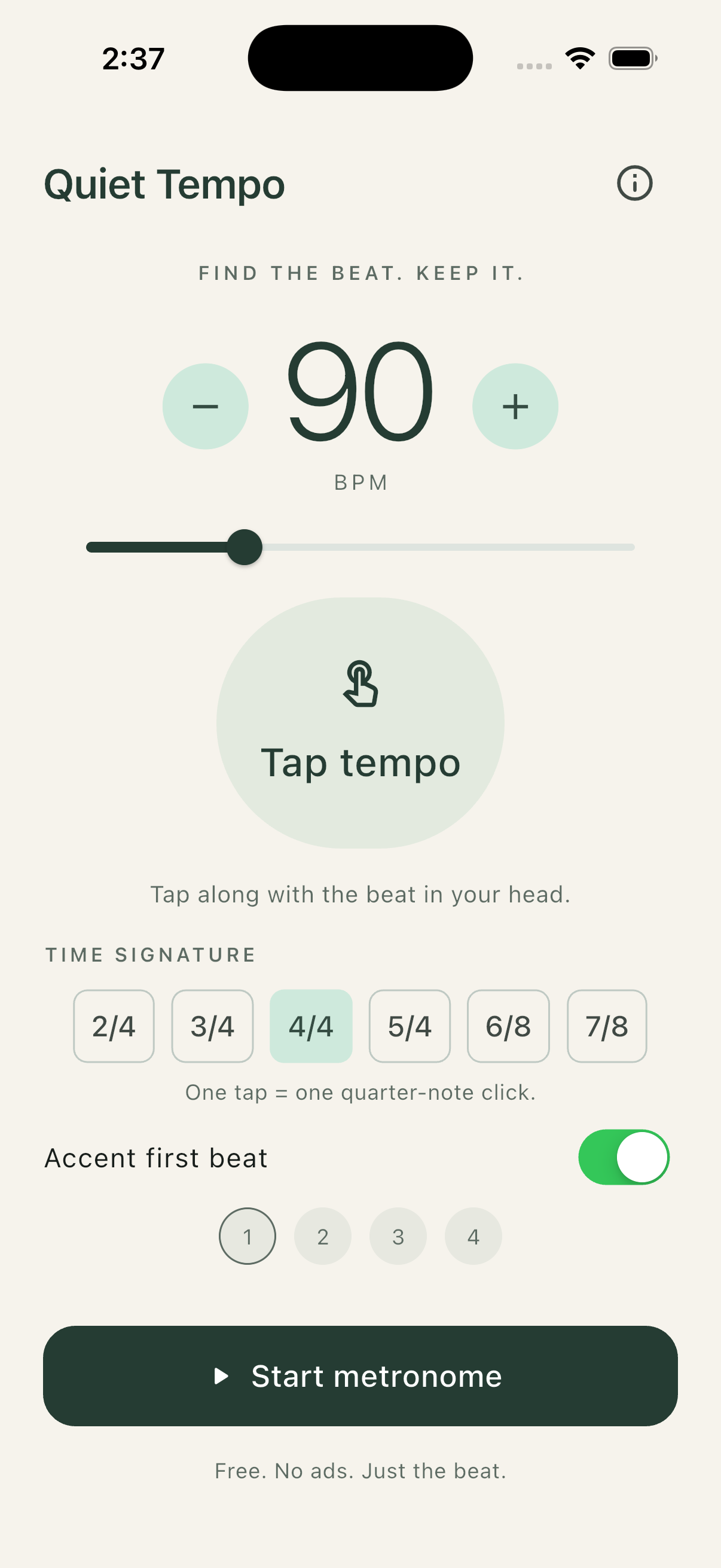
Catch the rhythm in your head. Tap to find its tempo, choose a time signature, and hear a steady click.
iPhone & iPad · Available now
Stay with the music.
- Tap your pulse. Two taps give an estimate. Keep tapping to refine it, or enter the BPM you already know.
- Choose your meter. Pick 2/4, 3/4, 4/4, 5/4, 6/8, or 7/8. Turn the first-beat accent on or off.
- Press Start. Play at 30–240 BPM, including while your screen is locked. Stop is always within reach.
A note about the beat
One tap equals one click. In /4, each click is a quarter note. In /8, each click is an eighth note: 6/8 gives six clicks per bar. Changing tempo or meter restarts the bar.
Ready when you return.
Your tempo, time signature, and accent preference are remembered on your device. The app always opens stopped. Phone calls and disconnected headphones stop playback; press Start when you’re ready again.
Quiet Tempo works offline. It measures your taps, so there’s no microphone access or audio recording.
Free, with no feature paywalls.
No ads or subscriptions. QuietDigital is built around voluntary support, with the full utility available to everyone.